Pages

Showing posts with label Sandybridge. Show all posts

Monday, July 22, 2013

[Article] Upgrade itch is so strong! Feeling like upgrading to 4770K Haswell from 2600K SandyBridge after all.

Many shops are giving JPY5,000 worth discounts if you buy a Haswell CPU and a Z87 motherboard these days. Sofmap.com has a eye-catching offer: Core i7 4770K and a Asus Z87 Pro motherboard for about JPY51,000. I sometimes feel like giving a shot at Haswell. I know it won’t give me much benefits over my current CPU and motherboard. But this upgrade itch has been crawling beneath my skin in the past few months. Worse case would be that I will get just about same performance as my current CPU and motherboard combo. That’s if I can only overclock to like 4.2GHz. If I can somehow manage to overclock to 4.5GHz, I will be able to sneak in 10% or so more performance. The temps definitely will play a vital role, especially with the temperature in the summer.

It’s not the CPU that is great actually. Z87 is a great chipset. It performs really well, plus, it uses so little power. It also comes with a lot of stuff my current motherboard doesn’t have, natively. I will get a much better motherboard. I can use the integrated fan controller and throw away (don’t take things literally unless I say so) my current Scythe fan controller. I have been wanting a fan controller that controls fan according to temps. With Asus’s unprecedented fan control software, I can achieve it. I hate the cable mess the current fan controller has created behind the motherboard tray.

Wednesday, July 3, 2013

Upgrade SandyBridge to IvyBridge-E this September?

Haswell for desktops was a flop. Now it is time to leave that sad incident behind and move on. Moving on means, looking forward to the next launch. The next launch from Intel is IvyBridge-E. IvyBridge-E CPUs are coming out this summer - September to be precise. That's only couple of months away from now. Fun times!
 
The IvyBridge-E CPUs
 
There are 3 models announced. The Core i7 4820K, 4930K and 4960X. Contrary to SandyBridge-E, all the CPUs are fully unlocked this time around. If you remember, Core i7 3820 was only partially unlocked.

The following is a detailed list of specifications of the upcoming IB-E CPUs. (image courtesy of Xbitlabs article)


Some more facts

The heat spreader is soldered to the die:


IB-E CPUs will have the die soldered to the heat-spreader. (Well, they have only confirmed it for the 4960X) IB didn't. IB simply had a thermal paste interface between the die and the heat-spreader. This caused IB to become hotter than SB when overclocked. Hence IB-E will have more thermal headroom for overclocking, which means it would be possible to overclock it higher than IB. Having a larger die (i.e. more surface area to dissipate heat) and having no iGPU would also help.

No x89 chipset:

It looks like there is no X89 core-logic coming out with IB-E. Intel's chipset roadmaps show X99 after X79 and X99 is for Haswell-E. The issue with X79 is that it lacks a lot of newer tech, such as native USB3.0 and more than two SATA-III ports. And a die Shrink would have improved thermals as well. This is good news for people who are running a Core i7 3820 because they can upgrade to a 4930K and enjoy a massive performance increase without spending a lot of money. You'll only need a bios upgrade at worst case. People running 3930K's or 3960X's won't see much of an improvement though.
 

So, upgrading to IB-E would be worth it?

 
The question remains. Is IvyBridge-E going to be a worthwhile upgrade from SandyBridge? You can receive a 50% increase in core count, unless you are stupid enough to get the 4820K. And there is 10% or so IPC boost. That would translate to about 60% more performance boost.

You will lose QuickSync support, which is not a big deal because Handbrake doesn't support QuickSync yet.

There will definitely be newer motherboards but sadly with the same old X79 chipset. I prefer having the controllers integrated with the chipset. I always disable the 3rd party controllers because they are not fast enough and I don't need that many ports in the first place.

But for most people, other than for bragging rights, this won't be a necessary upgrade. Games wouldn't benefit much for having two extra cores. But it would, if you are using quad GPUs, because the x79 platform provides 40 PCI-E lanes from the chipset (but this would be CPU in the case of IB-E), which allows you to use Quad GPU setups with hardly any performance drop or lag. Generally speaking, only the video editors will benefit from the added horsepower.

I guess I will wait and see how badly these Japanese shops will price the new CPUs. If I've learned something from the history, the pricing would be really bad. A 3930K costs ¥58,000 these days. That's about $580. Even if Intel releases 4930K at the same price, these bastards would sell them for like ¥70,000. Spending that much money only on the CPU is not going to happen in my book. When you think of it, I'd probably be stuck with my 2600K for eternity. The ugly truth!

Wait! I will have to renew my Internet connection in January. That means, I will get like ¥40,000 or so discount on select items when purchased with the internet connection. I hope the 4930K will be in that group of select items. :)

Monday, June 17, 2013

Is it worth upgrading to Haswell from IvyBridge or Sandybridge?

The official Haswell reviews came out at the beginning of this month (June, 2013) and they proved that the information that was leaked few weeks ago is completely accurate. Haswell is only having a single digit (percent) performance advantage over IvyBridge and they get very hot when overclocked. It seems you need a lot of luck and cooling power to even hit 4.4GHz. However, what you have to do to overclock the Haswell CPU should be quite simple.

Those new z87 motherboards are so delicious though. You get 6 SATA-III ports, 6 USB3.0 ports, PCI-E 3.0, integrated Wireless 802.11ac (certain models), much better integrated audio (certain models) and nice looks overall. Some people would even upgrade to Haswell for this alone. 

Check this HARDOCP article to see how Sandybridge, IvyBridge and Haswell all stand against each other when overclocked to 4.5GHz. This article also mentions all the pitfalls of overclocking Haswell. It's a good read. You should read it if you are planning to get a Haswell CPU and want to overclock it.

BTW, if you are planning to get a non-K CPU hoping that it would allow you to overclock at least a few hundred MHz, you would be disappointed. Only K-editions are overclockable. Others will be stuck to their stock Turbo Boost algorithm. You can try increasing the BCLK, but it won't get your much farther. 

On top of that, you don't get VT-d and TSX instructions support on the K-editions. They are only available on non-K editions. Intel is messing with the Overclocking community it seems. It clearly shows that they don't want use to overclock, because it handicaps their sales because people might not upgrade if their current CPU overclocks pretty well and is faster than the new CPUs. (This seems to be the case with a lot of SB and IB users against Haswell)

I evaluated a bit where the economics stand. I would obviously sell my existing CPU and motherboard if I upgrade to Haswell. According to the current second hand prices, I would only get like ¥22,000 for both of them. I might even add my Creative X-Fi Titanium audio card to that so I might get like ¥24,000 (because integrated audio on these boards is so good). But the Core i7 4770K alone costs little more than ¥35,000 and then add another ¥20,000 for a good motherboard. (It's the massive price you have to pay for getting stuff at launch here in Japan. Prices will drop few thousands in the coming months.) That's about ¥30,000 extra for almost no performance increase (well 15% best case increase isn't a lot). I must be insane to go ahead with the upgrade. 

Thus, my upgrade plans are officially done. I'm keeping my trusty Sandybridge. But being the geek I am, I won't stop there and give up. There are newer CPUs coming in few months, from both Intel and AMD. Hopefully I will be able to upgrade to one of them.

Monday, June 3, 2013

Reseated the CNPS9900Max-B heat sink, but no good

So, I finally managed to find time to take apart the PC and reseat the CPU heat sink. Removing this heat sink was very difficult. I had to take out the motherboard from the case, but after that it wasn't that hard. The cooler is pretty large so there isn't enough space inside the case to work with. There is a special Allen key that is required to remove the heat sink. I even had to remove the RAM modules because they were restricting the movement of the Allen key. BTW, if I lose it, I'm screwed. It is pretty hard to remove the cooler with regular tools. But I guess it is not impossible.
 
I used Arctic Cooling MX-4 for thermal paste. I had a tube of it lying around. That's what I was using before this. It is easy to apply. I used a card to spread the paste sparingly on the IHS of the CPU.
 
Installing the cooler back was not so hard since the motherboard was outside the case. But the whole process took a lot of time. A whole Saturday afternoon. I also cleaned up the dust in the case and arranged to the cables a bit. The back side of the motherboard tray is a cable mess. Thanks to the design of the case, it is well hidden. Just wish I had a PSU with modular cables. It would be much cleaner then. And the fan controller is not helping either. It has 12 wires coming out of it and the wires are not colored black. Yuk! These Japanese people don't know anything about aesthetics. (The fan controller is made by Scythe and that is a Japanese company.)
 
The heat sink didn’t need much cleaning though. There weren't much dust on it. Looks like the fan filters of the case are doing a pretty darn good job.
 
But unfortunately, everything that I did was in vain. I didn't see any improvement in cooling performance after the reseat. It was just like before. I wonder if I should have put a pebble of paste on the IHS and let the pressure of the cooler do the spreading. Or perhaps the stock thermal paste was better than MX-4. Or perhaps this cooler doesn't work well when placed in "pushing air up" orientation. In other chassis' , the cooler would be installed in an orientation where air would be blowing from front to back - horizontally. In my case, it has to be blowing air vertically. Plus, it could be why the fan vibrates when the RPM is between 1200 - 1600. The fan itself is so flimsy. Not rigid enough.
 
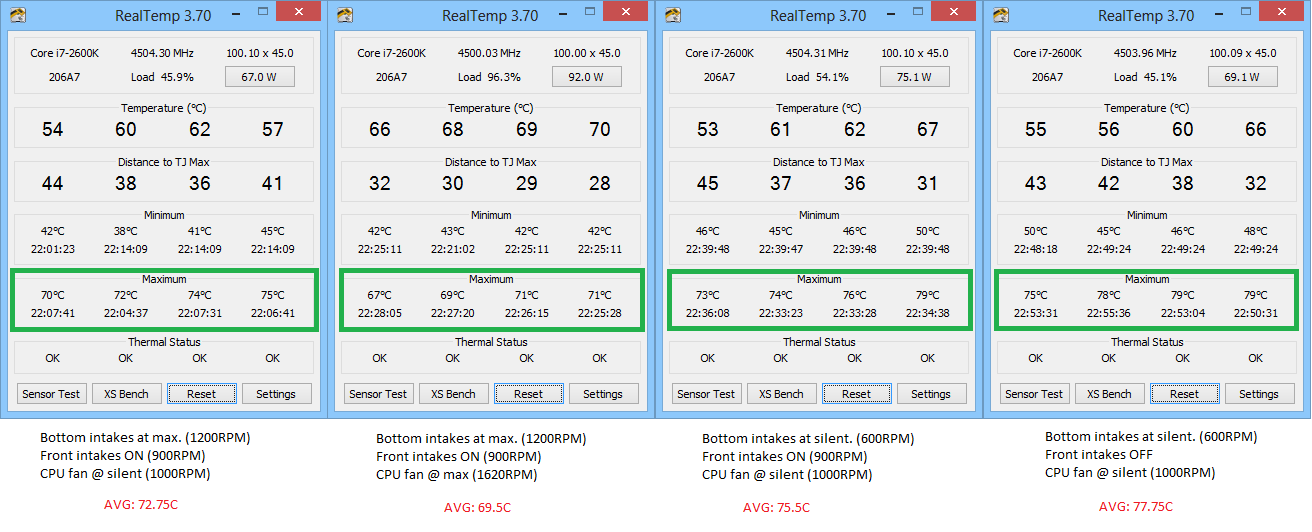
These are the temps when I transcode videos using Handbrake. (Look at the max temps. Realtemp was reset before every test.)
 
CNPS9900MAX temps 2600K while transcoding videos using Handbrake

Saturday, May 25, 2013

Something is wrong with my Zalman CNPS9900MAX-B CPU cooler!!!

I love silent computers. IMO, loud PCs are PCs with bad build quality. Hence, I’ve removed most of the fans that used to reside in the case, and further have lowered the RPM of the fans below 1000RPM. Well, right now, the loudest fan in the PC is the PSU fan when I’m not gaming, which of course isn’t controlled by me. When gaming, fan on the video card ramps up its RPM, making its presence very noticeable. Scythe Kaze Master Ace fan controller is the hero of the show.
 
The CPU cooler (Zalman CNPS9900MAX-B) is very loud when the fans is running at full speed. The stock RPM is 1700RPM and that’s insanely loud. So much for CNPS title! CNPS stands for “Computer Noise Prevention System”.
 
The CNPS9900MAX-B is not the best cooler out there. (Check Tim Logan’s review)The Thermalright Silver Arrow, for example, is much better. But there were few reasons for choosing this cooler.
  1. It didn't intervene with absurdly tall RAM sinks on my Corsair Vengeance sticks. Finding a decent cooler that passed this criteria was very hard. But now I think that I should have removed those RAM sinks (apparently, you can do that quite easily.) and bought a bigger cooler back then.
  2. The cooling performance wasn't really bad. It was up there with the best air coolers, only 5C or so behind the best of the best. It was definitely in the 85th percentile. 
  3. It looked nice. The fan was illuminated in blue. That’s what the letter B at the end means. And it didn't look overly large (but that was a misjudgment. It is a HUGE cooler, and unfortunately, most of it is air. The surface area of the cooler isn't THAT large.
So, the cooler is loud, and since I had the fan controller, I didn't really care about the noise back then. I have dropped the RPM of the fan to the point that the noise of it gets drowned under the ambient noise. That magic point lies just over 1000RPM. But at 1000RPM, the CPU temps increase by a little over 5C compared to 1700RPM. That’s not a big deal, if it was doing fine at 1700RPM in the first place. It does not!

Saturday, May 4, 2013

To upgrade to Haswell from Sandybridge or not! That’s the question.

With Intel’s Haswell release being right around the corner, the upgrade itch is crawling back into me. I currently use a Intel Core i7 2600K CPU and ASRock Z68 Extreme4 motherboard (i.e. Sandybridge) in my PC and they are quite capable even in the demanding tasks. The CPU is overclocked to 4.5GHz, which makes it way faster than the current (3rd) generation flagship CPU in every task. Probably, it would remain the same when Haswell CPUs come out as well, because the rate of increase in performance with each new generation of CPUs has dropped to single digit percentage numbers in the last few years. If the rumors are true, Haswell won’t be any different (this, this and this). If you checked that last link, you will see that most of the performance improvements come from the GPU side. I don’t care about that because I would always be using a discreet graphics card. (But knowing that Handbrake would get QuickSync support in the future, makes things a bit more interesting.) All in all, my CPU at 4.5GHz would still own the flagship member from Haswell at stock – at least in most benchmarks.

But the question remains, why am I even considering upgrading to Haswell? That’s because Haswell itself will overclock and once overclocked, it would leave my current overclocked CPU in the dust. If the rumors are true, you might be able to hit 6GHz with proper cooling with a Haswell CPU. That would make it about 50% faster than my current CPU. No concrete information is available about the overclockability of Haswell CPUs so I cannot really make a decision until the official reviews are out. But I am hopeful. We’ll find all about it in a month.

Haswell is not only about performance. It is also about power efficiency. Haswell CPUs will be able to do more work with less power. And the idle power usage seems to have dropped by 10 times. This is not anymore a rumor, but it seems that most of the crappy CPUs won’t be able to deliver the low currents required for Haswell CPUs when at idle. We always looked at how the PSU copes with high power demands and never at how the PSU copes with low power demands. Seems that crappy PSUs cannot deliver low power “stably”. That would probably give BSODs. I checked on Intel’s website and seems like my PSU is supported after all (Corsair 75-001311 aka 850TX). So I don’t need to change the PSU. But even if I had to, I wouldn’t be to displeased about it because I get to buy a PSU with modular cables and also something more efficient that the one I have.

Intel Haswell Box ArtBut, an important question remains: how important is power efficiency improvements in a desktop environment? Not so much, right, because there are so many other things that would be using up the power. The video card is the biggest culprit. Then there is RAM, hard drives, audio card and fan.

Then there is this USB issue with the early chips. With the buggy chips, when your PC goes into standby and you have a storage device plugged into USB3.0 ports, you will have to disconnect and reconnect the device to make it work after you resume from standby. It’s a nasty bug, but it is fixed in the latest chips. But the bug fixed chips won’t make it to the first motherboards. Rumor is that it would take about a month before the bug fixed versions of the motherboards hit the market. I would definitely wait for that.

When Haswell CPUs go on sale in Japan, the second hand market value of my current CPU and the motherboard would drop. I don’t know by how much, but it will definitely drop. I will have to evaluate the situation against those figures. I don’t want to receive only 1/3 the price of what I’m paying for the Haswell upgrade when I sell my current CPU and motherboard. That just doesn’t seem right.

All of these have to align, if I am to go ahead with the upgrade. The CPU has to overclock well; the bug fixed motherboards have to hit the market; I need to get something valuable from selling off my old stuff. I’m mostly concerned about the latter. Because even right now, I’m getting only about JPY 22,000 if I sell my CPU and mobo. :(

One important thing I forgot to mention. I currently use the Zalman CNPS9900MAX-B air cooler, and it is not the best out there, especially because it is so loud when the fans are running at full speed. I might upgrade this cooler to something decent with the Haswell upgrade. All depends on the overclockability. Too bad this case doesn’t support most of the hot (not literally) coolers out there. :(

Finally, let me list up the reasons for the upgrade.

  • 50% performance improvement over my current gear – when overclocked
  • Reduced overall power consumption
  • Better Windows 8 compatible hardware (motherboard site perhaps)
  • I only have to upgrade the CPU and the motherboard. (unless speed of RAM makes a difference; I only have ones running at 1600MHz)
  • Native USB 3.0 support (IvyBridge brought this to the table, but I don’t have an IvyBridge rig, do I?)
  • PCI-E 3.0 support. (Again, IvyBridge brought this to the table, but I don’t have an IvyBridge rig, do I? Besides, I already have a PCI-E 3.0 graphics card.)

Sunday, December 2, 2012

Prime95 with AVX support for Stress Testing your Sandybridge or IvyBridge CPU

I discovered this recently. I’ve been using Prime 95 without AVX support for all this time. Prime 95 with AVX support is the bomb. Just compare the temperature difference between the following screenshots.

Note: Small FFT stress test was run for 5 minutes.

Without AVX (v26.6)
2012-12-02_13-11-03

Wednesday, May 9, 2012

Overclocking the Intel Core i7 2600K with ASRock Z68 Extreme4

BX80623I72600KThere are few important things to know about overclocking your Sandybridge CPU.
 

BCLK:

Unlike the previous generation CPUs, with Sandybridge CPUs you don't have two parameters to change  when increasing the clock speed.
Clock speed = BCLK x Multiplier
Sandybridge CPUs have a default BCLK of 100MHz. You cannot increase it more than few MHz before the system becomes unstable. Some chips are capable of 103MHz or more, but most chip + motherboard
combinations don't like going above 100MHz at all. So the easier way to overclock your SB CPU is by increasing the multiplier. For that, you need to buy an unlocked CPU - denoted by the letter K at the end of the model name (e.g. 2600K)
 

Saturday, July 2, 2011

Intel Sandybridge, here I come (Core i7 2600K, ASRock Z68 Extreme4)

After a lot of thought, I went ahead with the Sandybridge upgrade. If you know me, you should know that I am always looking for the sweet spot when it comes to performance for the $$$. This time, things have changed.

Why did I have to upgrade?

Well, I didn’t have to, but there were few issues with my old PC.

  • It wouldn’t POST some times. It had warm boot problems.
  • I couldn’t add a second graphics card, if I wanted to, because the SATA ports would be right underneath the second card, rendering 4 out of 6 ports unusable. Of course I might not add one right now, because there is no real need at the moment. But definitely when BF3 comes out. Maybe I would buy two GTX560’s or 570’s.
  • I was doing a lot of video encoding stuff. A faster CPU would benefit.
  • And most importantly, fun! And we got our mid-year bonus + I made about 40k in the last couple of months from overtime work.
  • Besides, I could sell my old stuff off, so that I can make some of what I spent, back.

So what did I upgrade to?

Let’s see why I chose each of them.

Related Posts Plugin for WordPress, Blogger...