Pages

Showing posts with label cleaning. Show all posts

Friday, November 1, 2013

[Rant] How do you guys manage the cable clutter behind your PC?

One of the advantages of buying an Apple iMac or any other all-in-one desktop is that you don't get the cable clutter behind your PC which you would otherwise get with a typical desktop PC. In my PC, I have like dozen cables behind the desk. Some desks have a board at the back that would hide most of that clutter, but mine doesn't. You. Can see all those cables and it looks ugly. 

Couple of days ago, I moved the computer desk to a slightly different place. While the new place allows me to show off the internals of the PC unlike before, the cable clutter also became more visible. So I had to do something about it.

I bundled cables that went to the same direction together. Some I routed along the edge of the floor and wall. The display power cable and the main speaker cable were routed along a leg of a desk and taped. The main bundle consisting if the HDMI cable, keyboard cable and the webcam cable were routed right in the middie and that's what's visible mainly. However, there is still the two iPhone cables, headphone cable and the LeapMotion cable which I haven't been able to take care of. The headphone cable is so darn long. Maybe I should completely remove the headset and keep it elsewhere when in not using it. 

Before


After


(The iPhone 5S camera didn't seem to do a good job there! Too lazy to pull up the Canon S95.)

Perhaps I should get a USB hub and connect all those USB cables to it? Maybe I should get a dock? Maybe I should get a Roccat Apuri which is a USB hub + mouse cable holder (to reduce the drag with the desk or mouse pad or whatever the cable comes in contact with, when you are playing games.

Or perhaps this is good enough. It is night and day better than what it was like before. 

Monday, June 3, 2013

Reseated the CNPS9900Max-B heat sink, but no good

So, I finally managed to find time to take apart the PC and reseat the CPU heat sink. Removing this heat sink was very difficult. I had to take out the motherboard from the case, but after that it wasn't that hard. The cooler is pretty large so there isn't enough space inside the case to work with. There is a special Allen key that is required to remove the heat sink. I even had to remove the RAM modules because they were restricting the movement of the Allen key. BTW, if I lose it, I'm screwed. It is pretty hard to remove the cooler with regular tools. But I guess it is not impossible.
 
I used Arctic Cooling MX-4 for thermal paste. I had a tube of it lying around. That's what I was using before this. It is easy to apply. I used a card to spread the paste sparingly on the IHS of the CPU.
 
Installing the cooler back was not so hard since the motherboard was outside the case. But the whole process took a lot of time. A whole Saturday afternoon. I also cleaned up the dust in the case and arranged to the cables a bit. The back side of the motherboard tray is a cable mess. Thanks to the design of the case, it is well hidden. Just wish I had a PSU with modular cables. It would be much cleaner then. And the fan controller is not helping either. It has 12 wires coming out of it and the wires are not colored black. Yuk! These Japanese people don't know anything about aesthetics. (The fan controller is made by Scythe and that is a Japanese company.)
 
The heat sink didn’t need much cleaning though. There weren't much dust on it. Looks like the fan filters of the case are doing a pretty darn good job.
 
But unfortunately, everything that I did was in vain. I didn't see any improvement in cooling performance after the reseat. It was just like before. I wonder if I should have put a pebble of paste on the IHS and let the pressure of the cooler do the spreading. Or perhaps the stock thermal paste was better than MX-4. Or perhaps this cooler doesn't work well when placed in "pushing air up" orientation. In other chassis' , the cooler would be installed in an orientation where air would be blowing from front to back - horizontally. In my case, it has to be blowing air vertically. Plus, it could be why the fan vibrates when the RPM is between 1200 - 1600. The fan itself is so flimsy. Not rigid enough.
 
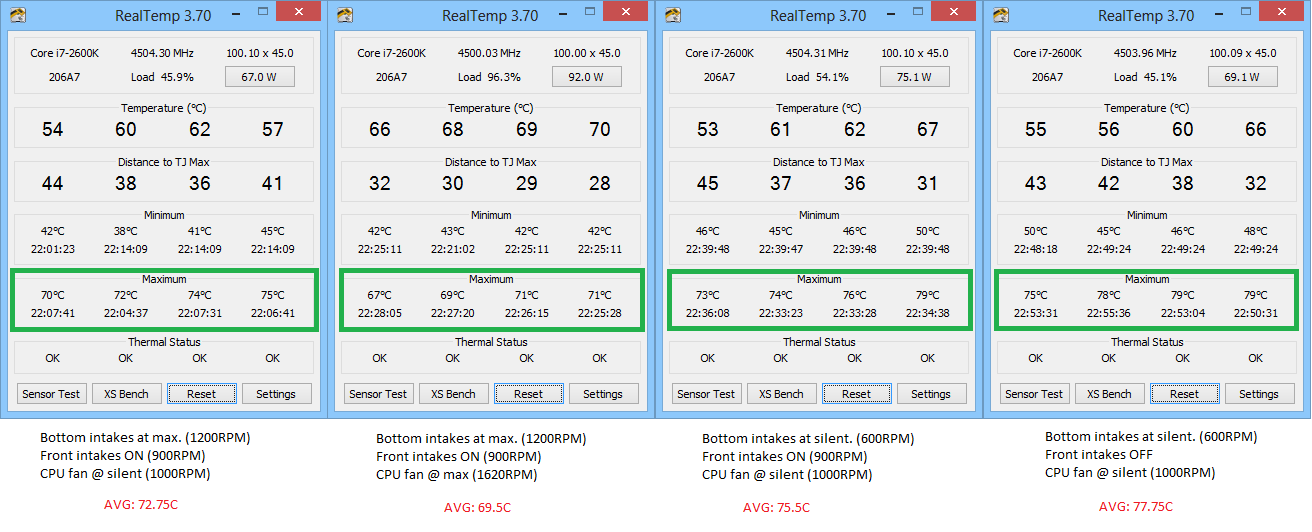
These are the temps when I transcode videos using Handbrake. (Look at the max temps. Realtemp was reset before every test.)
 
CNPS9900MAX temps 2600K while transcoding videos using Handbrake

Thursday, May 30, 2013

Dust busting!

So I'm finally set for cleaning up the inside of the PC chassis. I will also be reseating the HSF while I'm at it. All this was because of this post. I’m not sure if the cooler itself is the culprit, so this is to check that. If I manage to drop the max delta temps of the CPU to 50C after reseating and cleanup up, then I would keep the current cooler. Else, I might have to look for a new cooler.

But first things first. I have to start from the outside. From the things that I can see. So I decided to clean up the fan filters for the intake fans of the case. There were little dust on the first front fan filters. But there was a lot of dust on the bottom ones. A LOT!

IMG_1591 IMG_1590

The one on the left is the filter for the intake of the PSU fan. The one on the right is the filter for the two 180mm air penetrator fans.

I washed them up and fitted back and ran Prime95 for 20 minutes. Well, I didn't really see a noticeable drop in temps, but who cares? At least I feel it is running cooler now. That's what matters. What your mind feels is what matters.

I was planning to do the full clean up job today, but it got late. Maybe in the weekend. At least the PC won't suffocate during that time.

Related Posts Plugin for WordPress, Blogger...