Pages

Showing posts with label cooling. Show all posts

Wednesday, July 30, 2014

The replacement HE01 cooler works fine...phew!

DIP4_2014-07-24_20-28-37When I got the replacement cooler from Amazon, the first thing I did was to plug the fan directly into the power supply. When you do that, the expected result is for the fan to spin up at full speed - that is at 2000RPM. I made sure that the RPM limiter switch was switched to the performance mode as well. To my relief, the fan seemed to run at full speed though there was no way to confirm that the fan was hitting 2000RPM. But it definitely felt like 2000RPM, for the sound and the air flow generated from it.

But I wouldn't be running the fan directly off the PSU. I would be running it off the motherboard CPU fan headers. It wouldn’t mean squat if it cannot work with the motherboard. So to find out if if the motherboard truly wasn’t the culprit the last time, I plugged in the fan to the motherboard and luckily for me, it also ran at full speed. w00t!

There was no way in hell that I would be running the fan at 2000RPM. While it is not as deafening as the two TY-143’s I had on the Silver Arrow Extreme cooler, I still had to tame down the fan speed.

Tuesday, July 29, 2014

The Silverstone FHP-141 on my HE01 got stuck at 500RPM

HE01

It is the weirdest thing that I have ever encountered.

Couple of days before I ordered the Maximus VII Gene motherboard, I ordered the Silverstone Heligon HE01 CPU cooler. The cooler worked pretty well on my old Maximus VI Hero motherboard. I had the fan on the CPU fan header and just used the automatic fan control settings in the UEFI.

But when I installed the cooler on the new motherboard, the fan stopped working properly. When I say "stopped working properly", I mean that the fan did not want to rev past 500RPM. The fan is supposed to rev up to 2000RPM at its maximum PWM signal strength. What's so special about 500RPM figure is that it is the lowest RPM that the fan can operate using the PWM signal.

I blamed the motherboard at first. That was the obvious thing to do given the circumstances. I thought the PWM signal from the motherboard was not compatible with the fan. Asus does a lot of non-standard things with their motherboards (that's to give more value additions of course), the Fan Xpert feature in this case.

Tuesday, July 22, 2014

My Silverstone Heligon HE10 cooler is here and it's great!

00_logo

My new CPU cooler - the Silverstone HE01 - arrived on Sunday July 20. It came in a fairly larger box that I anticipated. Despite being a dual tower cooler, it was not supposed to be as large as the Silver Arrow SB-E Extreme cooler that I had in my rig a few months ago. That was because it comes with just one fan and the front tower itself was thin.

I quickly took my PC apart. As it wasn't that long ago that I installed the water cooler, I remembered the steps to quickly remove the Antec Kuhler 620 cooler. Then I got down to the real business - installation of the cooler.

There was no time for a photo-shoot. Everything came packed well. There was an instruction manual but it was of very low quality. A lot of instructions and diagrams were omitted from it. But with a little bit of common sense, I could install the cooler just fine. Mounting of the heatsink didn't take that long. It was much easier than the Silver Arrow because the spacing between the two towers was larger due to the 38mm fan that goes in between. Installation of the fan was harder as I installed the cooler with the motherboard plugged in. Like expected, there was no issues with the RAM clearance.

Wednesday, July 9, 2014

In search for the best CPU cooler

haswell-cooling-1

The best doesn’t necessarily mean that the cooling performance is highest. I’m sure many can design a cooler the performs much better than the ones available for purchase, if the system – case and other components - can be fixed. Like in the case of the Apple’s Trash Can.

Let’s back on the topic shall we? Why am I searching for a new CPU cooler? Because of this and this.

I already have planned on which case to get if I manage to sell this. It’s either the Silverstone SG09 or SG10. They are small and optimized for air cooling. There is only one place you can mount a radiator and that is the rear exhaust. Even then, it is only a 120mm radiator. A lot of high-end air coolers perform much better than the best 120mm AIO water cooling unit. Heck, some even perform better than the dual 120mm units. My current case also is optimized for air cooling and doesn’t support larger than 120mm radiators out of the box.

Now that I had ruled out all of the AIO water cooling units, it was time to check out air coolers available in Japan. I managed to get a rough idea about which models were available in the market. In fact it seemed that all the high-end models were available. The prices were, though,  sky-high on most of them. All except two dual tower coolers were going for more than JPY10,000.

What happened when I reseated the Antec Kuhler 620's water block?

file_9

In the previous post I mentioned that there was a problem with cooling of my new CPU. The Antec Kuhler 620 CPU that I had been using to cool it was not up to the task. The CPU was touching TJ-max kind of core temperature when stress tested using OCCT 4.4.

There was one thing for me to do: reseating of the water block.

I had some free time in the last weekend as the baby went into his regular evening nap, so I went down to business.

Almost all the guides out there recommend that you use a tiny amount of thermal paste in the middle of the heat spreader and let the pressure from of the heatsink mounting mechanism spread and thin the paste. I followed the same guide. But when this method is employed, the spread become a circular area and the edges don’t get proper contact with the heatsink. I thought the thermal issues that I had were caused by this contact issue. I cannot remember if I mentioned this before, but the pressure from the mounting mechanism seemed insufficient. The spread could be better with other heatsinks with better mounting pressure.

Wednesday, June 19, 2013

Bought a couple of Silverstone F122 magnetic fan filters

When I bought the Silver Arrow SB-E Extreme cooler few days ago, I ordered a couple of Silverstone F122 magnetic fan filters to cover the two open vents I had in my case. The exhaust at the rear of the case (towards to top) and the intake on the side panel behind the motherboard to cool the hard drives.

I noticed that a lot of dust was trapped on those fan holes. Definitely they were going into the case. I was hoping to make a fan filter from one of wife's torn stockings but it didn't come out the way I liked. So I finally gave in and bought these. They cost me about ¥450 a piece. So, not cheap at all. But it's OK. These don't need replacing ever. 

They came with screws as well, but they simply stick to my case; both places in fact. It doesn't move or anything. Just firmly sits there. 


The following is just a demonstration. Since I don't actually have a fan on the side panel, I have mounted the filter from the inside of the case so it doesn't show to the outside.


When I took one off to take a photo for this post. I noticed that it already had some dust on it. Hence, they seem to be working just as promised. This is definitely not a regrettable purchase. Funny how seldom that happens. 

Monday, June 3, 2013

Reseated the CNPS9900Max-B heat sink, but no good

So, I finally managed to find time to take apart the PC and reseat the CPU heat sink. Removing this heat sink was very difficult. I had to take out the motherboard from the case, but after that it wasn't that hard. The cooler is pretty large so there isn't enough space inside the case to work with. There is a special Allen key that is required to remove the heat sink. I even had to remove the RAM modules because they were restricting the movement of the Allen key. BTW, if I lose it, I'm screwed. It is pretty hard to remove the cooler with regular tools. But I guess it is not impossible.
 
I used Arctic Cooling MX-4 for thermal paste. I had a tube of it lying around. That's what I was using before this. It is easy to apply. I used a card to spread the paste sparingly on the IHS of the CPU.
 
Installing the cooler back was not so hard since the motherboard was outside the case. But the whole process took a lot of time. A whole Saturday afternoon. I also cleaned up the dust in the case and arranged to the cables a bit. The back side of the motherboard tray is a cable mess. Thanks to the design of the case, it is well hidden. Just wish I had a PSU with modular cables. It would be much cleaner then. And the fan controller is not helping either. It has 12 wires coming out of it and the wires are not colored black. Yuk! These Japanese people don't know anything about aesthetics. (The fan controller is made by Scythe and that is a Japanese company.)
 
The heat sink didn’t need much cleaning though. There weren't much dust on it. Looks like the fan filters of the case are doing a pretty darn good job.
 
But unfortunately, everything that I did was in vain. I didn't see any improvement in cooling performance after the reseat. It was just like before. I wonder if I should have put a pebble of paste on the IHS and let the pressure of the cooler do the spreading. Or perhaps the stock thermal paste was better than MX-4. Or perhaps this cooler doesn't work well when placed in "pushing air up" orientation. In other chassis' , the cooler would be installed in an orientation where air would be blowing from front to back - horizontally. In my case, it has to be blowing air vertically. Plus, it could be why the fan vibrates when the RPM is between 1200 - 1600. The fan itself is so flimsy. Not rigid enough.
 
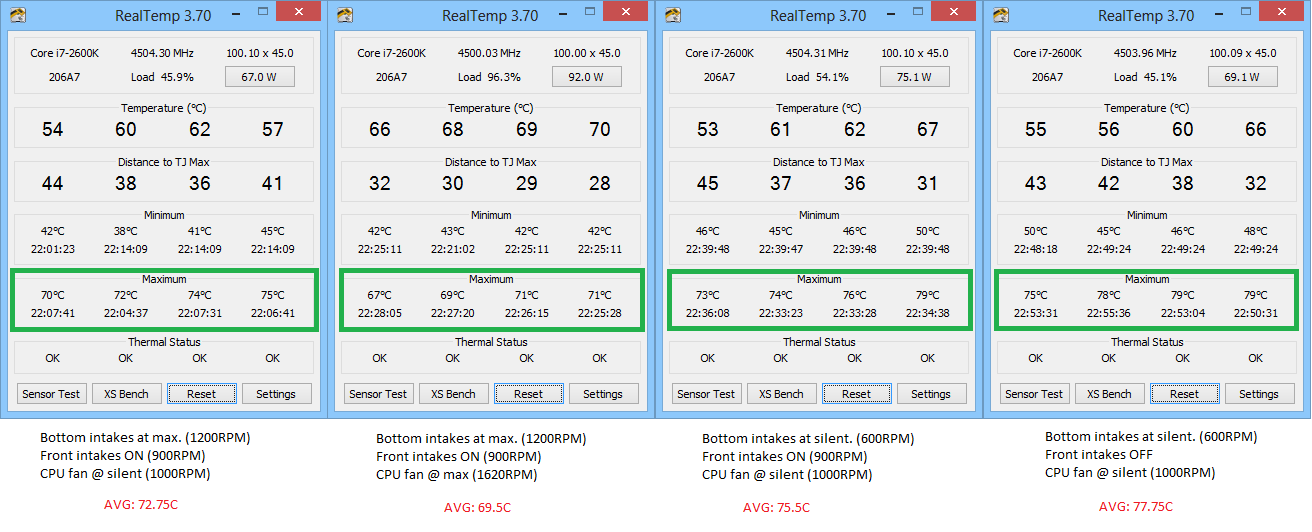
These are the temps when I transcode videos using Handbrake. (Look at the max temps. Realtemp was reset before every test.)
 
CNPS9900MAX temps 2600K while transcoding videos using Handbrake
Related Posts Plugin for WordPress, Blogger...